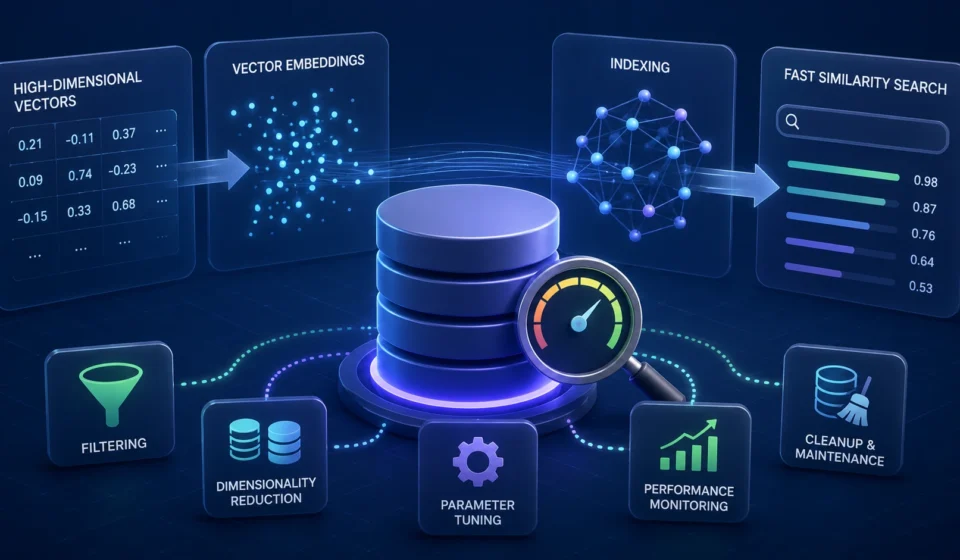
How to Optimize Vector Database Query Speeds for Large-Scale LLM Applications

As large language model (LLM) applications scale from prototypes to production systems serving millions of users, the vector database powering retrieval-augmented generation (RAG), semantic search, and recommendation engines often becomes the silent bottleneck. A slow vector database doesn’t just hurt user experience — it inflates infrastructure costs, increases LLM token latency, and limits how much context you can realistically retrieve per query.
Why Vector Database Speed Matters for LLM Applications
In a typical RAG pipeline, a user query is embedded into a high-dimensional vector, compared against millions (or billions) of stored vectors, and the top-k nearest neighbors are retrieved before being passed to the LLM as context. Every millisecond spent in this retrieval step adds directly to end-to-end response latency.
At small scale (thousands of vectors), almost any indexing approach works fine. But once collections grow into the tens of millions or billions of embeddings — common in enterprise search, chatbots, and recommendation systems — naive brute-force search becomes computationally infeasible, and query speed becomes a first-class engineering concern.
1. Choose the Right Indexing Algorithm
The single biggest lever for query speed is the underlying Approximate Nearest Neighbor (ANN) index. Exact search (brute-force k-NN) guarantees perfect recall but scales linearly with dataset size — unacceptable for large-scale applications.
HNSW (Hierarchical Navigable Small World)
HNSW builds a multi-layer graph structure that allows logarithmic-time traversal to approximate nearest neighbors. It offers an excellent balance of speed, recall, and memory usage, which is why it’s the default index in most modern vector databases (Milvus, Weaviate, Qdrant, pgvector).
- Pros: High recall, fast query times, good for dynamic (frequently updated) datasets.
- Cons: Higher memory footprint since the full graph is typically held in RAM.
- Tuning tips: Increase
ef_searchfor higher accuracy at the cost of latency; increaseM(graph connectivity) during index build for better recall on large datasets.
IVF (Inverted File Index)
IVF partitions the vector space into clusters (via k-means) and restricts search to only the most relevant clusters (nprobe), significantly reducing the search space.
- Pros: Lower memory usage than HNSW, easier to scale horizontally.
- Cons: Recall depends heavily on cluster quality and
nprobetuning; less effective for frequently changing data.
IVF-PQ (Inverted File + Product Quantization)
Combining IVF with Product Quantization compresses vectors into compact codes, drastically cutting memory usage while maintaining reasonable recall — ideal for billion-scale datasets where RAM cost becomes prohibitive.
DiskANN
For datasets too large to fit in memory, DiskANN-style indexes (used by Milvus and Azure Cognitive Search) enable efficient on-disk ANN search with SSD-optimized graph traversal, trading a small latency increase for massive scalability.
Recommendation: Use HNSW for sub-10M vector collections requiring low latency and frequent updates. Move to IVF-PQ or DiskANN once you cross the 100M+ vector threshold or face memory constraints.
2. Apply Vector Quantization to Reduce Compute and Memory Load
Quantization reduces the precision of vector representations, shrinking both memory footprint and distance-computation time.
- Scalar Quantization (SQ): Converts 32-bit floats to 8-bit integers, cutting memory by ~4x with minimal recall loss.
- Product Quantization (PQ): Splits vectors into subspaces and quantizes each independently, enabling extreme compression (up to 90%+ memory reduction) for massive datasets.
- Binary Quantization: Converts vectors to binary codes for ultra-fast Hamming-distance comparisons — useful as a fast pre-filtering step before a more precise re-ranking pass.
A common production pattern is two-stage retrieval: use a quantized index for fast initial candidate retrieval, then re-rank the top candidates using full-precision vectors for accuracy.
3. Optimize Sharding and Horizontal Scaling
No single machine can efficiently serve a billion-vector index. Sharding distributes vectors across multiple nodes, allowing parallel query execution.
- Hash-based sharding: Distributes vectors evenly but requires querying all shards (scatter-gather), which can increase tail latency.
- Cluster-based sharding: Groups semantically similar vectors on the same shard, allowing queries to target fewer shards — reducing network overhead but requiring more sophisticated routing logic.
- Replica scaling: Adding read replicas per shard improves query throughput under high concurrency without touching latency for individual queries.
Most managed vector databases (Pinecone, Zilliz Cloud, Weaviate Cloud) handle sharding automatically, but self-hosted deployments should benchmark shard count against query latency to find the sweet spot — too many shards increases coordination overhead, too few limits parallelism.
4. Use Metadata Filtering Efficiently
LLM applications frequently combine vector similarity search with metadata filters (e.g., “search only documents from the last 30 days” or “filter by user permissions”). Poorly optimized filtering can silently kill query speed.
- Pre-filtering applies metadata filters before ANN search, which can be expensive if filters are highly selective and the index doesn’t support filter-aware traversal.
- Post-filtering retrieves more candidates than needed and filters afterward — faster in some engines but risks returning fewer results than requested if filters are strict.
- Filter-aware indexes (like Qdrant’s payload indexing or Weaviate’s inverted filters) integrate filtering directly into graph traversal, avoiding the pre/post-filter tradeoff entirely.
Always index frequently filtered metadata fields separately, and avoid filtering on high-cardinality unindexed fields at query time.
5. Leverage Hardware Acceleration
- GPU-accelerated search: Libraries like NVIDIA’s RAPIDS RAFT and FAISS-GPU can accelerate distance computations by 10–100x for large batch queries, particularly valuable for high-throughput RAG pipelines.
- SIMD optimization: Modern vector databases use CPU SIMD instructions (AVX2, AVX-512) for distance calculations — ensure your deployment environment supports these instruction sets.
- Memory-mapped storage: For disk-based indexes, NVMe SSDs dramatically reduce the latency penalty compared to traditional storage.
6. Cache Aggressively
Many LLM applications exhibit repeated or similar queries (common questions, popular documents). Implementing a caching layer in front of the vector database can eliminate redundant searches entirely.
- Exact-match caching: Cache results for identical query embeddings.
- Semantic caching: Cache results for queries whose embeddings fall within a similarity threshold of a previous query — tools like GPTCache implement this pattern specifically for LLM pipelines.
- Result caching at the application layer: Reduces load on the vector database during traffic spikes.
7. Right-Size Your Embedding Dimensions
Higher-dimensional embeddings (1536, 3072+) improve semantic richness but increase both storage and compute cost per query. Consider:
- Using Matryoshka embeddings (supported by newer embedding models) that allow truncating vector dimensions at query time without retraining, letting you trade a small amount of accuracy for significant speed gains.
- Benchmarking whether a smaller embedding model (e.g., 384 or 768 dimensions) meets your recall requirements — the speed difference at scale is substantial.
8. Tune Query Parameters for Your Recall/Latency Budget
Every ANN index exposes tunable parameters that trade recall for speed:
| Index Type | Key Parameter | Effect |
|---|---|---|
| HNSW | ef_search |
Higher = better recall, slower query |
| IVF | nprobe |
More clusters searched = better recall, slower query |
| PQ | Subvector count | More subvectors = better accuracy, more compute |
Run systematic benchmarks against your actual query distribution rather than relying on default settings — production recall/latency tradeoffs vary significantly by dataset and use case.
9. Monitor and Continuously Benchmark
Query speed optimization isn’t a one-time task. Set up ongoing monitoring for:
- p50/p95/p99 query latency
- Recall rate against a ground-truth validation set
- Index build/update time as the collection grows
- Memory and CPU/GPU utilization under load
Tools like Prometheus and Grafana, combined with vector-database-native monitoring (Milvus’s built-in metrics, Pinecone’s dashboard), help catch performance regressions before they impact users.
Common Mistakes That Slow Down Vector Databases
- Using brute-force search on datasets beyond a few hundred thousand vectors.
- Over-provisioning
ef_searchornprobefar beyond what recall requirements demand. - Ignoring metadata filter indexing, causing full-collection scans.
- Rebuilding indexes synchronously during high-traffic periods.
- Using full-precision vectors when quantized vectors would meet accuracy requirements.
Conclusion
Optimizing vector database query speed for large-scale LLM applications is rarely about one silver-bullet fix — it’s the compounding effect of choosing the right ANN index, applying quantization, sharding intelligently, filtering efficiently, and continuously benchmarking against real production traffic. Teams that treat vector search performance as an ongoing engineering discipline — not a one-time setup step — consistently achieve lower latency, lower infrastructure costs, and better user-facing LLM experiences.
Frequently Asked Questions
What is the fastest indexing algorithm for vector databases?
HNSW generally offers the best speed-to-recall ratio for datasets up to tens of millions of vectors. For billion-scale datasets, IVF-PQ or DiskANN often perform better due to lower memory requirements.
How much does quantization affect accuracy?
Scalar quantization typically causes minimal recall loss (1–3%), while aggressive product quantization can reduce recall by 5–10% depending on configuration — always validate against your own dataset.
Should I use a managed or self-hosted vector database for large-scale LLM apps?
Managed solutions (Pinecone, Zilliz Cloud) reduce operational overhead and handle sharding/scaling automatically, while self-hosted options (Milvus, Qdrant, Weaviate) offer more tuning control at the cost of additional infrastructure management.